Guidelines for Grok Bot Grok Bot 使用指引

Division Agent: We grow together, on the same battleship Division Agent:我們同船成長,共乘一艘戰艦

Division Agent is a practical guide for individuals and teams who use Grok Bot. Learn how to brief clearly, choose the right tools, reuse skills, write small helpers, and run multi-bot workflows with confidence. Division Agent 為個人與團隊提供實用的 Grok Bot 指引:如何清楚下指令、選擇合適工具、複用技能、撰寫小幫手,以及有條理地運作多 Bot 協作。

Growth with your bots 與 Bot 一起成長

Point-form notes each week: the weekly Grok Bot product / feature notes pulled by Daily Keeper’s Monday routine, plus project-based learning on career work where relevant. Not product spam. Weeks in Asia/Shanghai. Formal weekly Grok Bot update routine from 14 Oct 2026 (first delivery 19 Oct)—earlier weeks have no formal Grok Bot changelog pull. 每週條列:由 Daily Keeper 每週一例行任務拉取的Grok Bot 產品/功能更新,以及相關的職涯/專案式學習。不是產品洗版。週次以 Asia/Shanghai 為準。正式「每週 Grok Bot 更新」例行任務自 2026-10-14 起(首次交付 10-19)——更早週次尚無正式 Grok Bot 更新拉取。

13–19 Oct 2026

Week of 13–19 Oct 2026 2026-10-13 → 2026-10-19

  • Grok Bot (Daily Keeper pull, delivered 19 Oct): No new desktop app version this week—latest remains v0.70.2 (11 Oct). Worth knowing: Bot email; X search without connecting X; in-chat app cards (Notion / Figma / Canva); stronger approval before send / post / buy / delete; clearer routine “who gets the result” summaries. Grok Bot(Daily Keeper 拉取,10-19 交付):本週無新桌面版——最新仍為 v0.70.2(10-11)。值得知悉:Bot 電郵;無需連接 X 即可搜尋;對話內應用卡片(Notion/Figma/Canva);發送/發文/購買/刪除前更強核准;例行任務「誰收到結果」摘要更清楚。
  • The X Subscription (12 Oct): One plan covering Grok, Grok Bot, Cursor, and X Premium—with a shared weekly Grok-usage pool across apps (not a monthly dump). Existing Cursor / SuperGrok / X Premium accounts can switch in billing. Third-party models in Cursor on the new tiers are pay-as-you-go outside that pool. Links: forum post · pricing. The X Subscription(10-12):單一方案涵蓋 Grok、Grok Bot、Cursor 與 X Premium——跨應用共用每週 Grok 用量池(非每月一次傾倒)。既有 Cursor/SuperGrok/X Premium 可於帳單設定切換。新方案下 Cursor 第三方模型為用量另計、不進該池。連結:論壇說明 · 定價。
  • Also: Supabase joined the SpaceXAI Partner Network (13 Oct)—ask a Bot in chat; Cursor can ship against Supabase via MCP. ~5h Bot-computer reachability outage on 14 Oct; resolved the same day. 其他:Supabase 加入 SpaceXAI Partner Network(10-13)——可在對話請 Bot;Cursor 可經 MCP 對 Supabase 交付。10-14 Bot 電腦約 5 小時無法連線,當日已恢復。
  • Tips (multi-bot): After any plan switch, watch the weekly shared usage pool—many specialized bots plus overnight routines can burn a week’s allowance faster than an old monthly dump. A bot can claim its own email and wake on inbound mail. Prefer lean reminders so routine wakes do not multiply against the same weekly pool. Full changelog: x.ai/changelog/bot. 提示(多 Bot):切換方案後留意每週共用用量池——多個專職 Bot 加上夜間例行,可能比舊的每月額度更快用完一週。Bot 可申請專屬電郵並在來信時喚醒。例行提醒宜精簡,避免多次喚醒疊加同一週用量。完整更新:x.ai/changelog/bot。
  • Career / project learning alongside the pull: tender / SoR package review practice; media + TTS trial; Manus-style episode workflow trial; Drive-by-bot draft slots kept in force. 同週職涯/專案學習:標書/SoR 套件覆核練習;媒體+TTS 試做;Manus 風格集數流程試做;維持按 Bot 上傳 Drive 草稿。
6–12 Oct 2026

Week of 6–12 Oct 2026 2026-10-06 → 2026-10-12

  • No formal Daily Keeper Grok Bot changelog pull yet (routine starts 14 Oct). Career practice only this week. 尚未有正式 Daily Keeper Grok Bot 更新拉取(例行任務自 10-14 起)。本週僅職涯練習。
  • Multi-bot organisation practice: lean alert / digest routines; lighter cadence instead of heavy sessions. 多 Bot 組織練習:精簡提示/摘要例行;以較輕節奏取代沉重長會話。
  • API / connecting-apps practice: wire a bot to Drive and related connectors for draft handoff (no secrets in prompts). API/連接應用練習:把 Bot 接到 Drive 等連接器做草稿交接(提示中不含機密)。
  • Coding helpers: small Python tools for file rename, CSV tidy, and checklist diffs—run locally, review before reuse. 編程幫手:小型 Python 工具做重新命名、CSV 整理與清單比對——本機執行,覆核後再複用。
  • Shared workspace copy rule documented so every bot knows where drafts live. 文件化共用工作區複製規則,讓每個 Bot 知道草稿存放位置。
29–5 Sep–Oct

Week of 29 Sep–5 Oct 2026 2026-09-29 → 2026-10-05

  • No formal weekly Grok Bot changelog pull (pre–14 Oct routine). 尚無正式每週 Grok Bot 更新拉取(早於 10-14 例行任務)。
  • Drafted professional letters / correspondence with bots (tone, structure, bilingual EN|繁中)—human sends only after approval. 用 Bot 起草專業書信/往來函件(語氣、結構、EN|繁中雙語)——人工核准後才發送。
  • Portfolio help: outline sections, select anonymized work samples, and write short case blurbs for career use. 作品集協助:規劃章節、挑選去識別作品樣本,並撰寫職涯用短案例說明。
  • Continued coding / Python practice: ask the bot to scaffold helpers, then read and tighten the code yourself. 持續編程/Python 練習:請 Bot 搭幫手骨架,再自行閱讀與收緊程式。
22–28 Sep 2026

Week of 22–28 Sep 2026 2026-09-22 → 2026-09-28

  • No formal weekly Grok Bot changelog pull (Monday routine created later on 14 Oct). 尚無正式每週 Grok Bot 更新拉取(每週一例行任務於其後 10-14 建立)。
  • Early career project-based learning with bots: brief a role clearly, keep drafts reversible, name an owner for irreversible steps. 早期職涯專案式學習:把角色指令寫清楚、草稿保持可逆、不可逆步驟指定負責人。
  • Explored media and design skills (theme / canvas / frontend) as practice—not as a product push. 探索媒體與設計技能(主題/畫布/前端)作為練習——非產品推銷。

Step-by-step tutorials 逐步教學

Full step outlines from the Slime Classroom / Division Agent guide series. Cards expand into numbered steps. Links and PDF downloads appear when each tutorial is published. Kids videos live under For Kids topic cards—not embedded here. 來自史萊姆教室/Division Agent 指引系列的完整步驟大綱。卡片展開為編號步驟。各教學正式發布後再附連結與 PDF。給孩子的影片在給孩子主題卡片——此處不嵌入。

01 Tutorial · step outline 教學 · 步驟大綱

Create a new bot 用 dr eggbot 建立新 Bot

Walk through creating a dedicated bot with dr eggbot—persona, scope, first brief. 用 dr eggbot 建立專用 Bot——人設、範圍與第一份指令。

  1. Open a 1:1 chat with dr eggbot 打開與 dr eggbot 的 1:1 對話
  2. Describe the job the new bot should own 描述新 Bot 要負責的工作
  3. Answer preference questions (purpose, language, tone, never-do, routines) 回答偏好問題(用途、語言、語氣、不做事項、例行任務)
  4. Review the bot eggbot creates (name, title, brief) 覆核 eggbot 建立的 Bot(名稱、職銜、簡介)
  5. Open the new bot’s own 1:1 chat and give a first small task 打開新 Bot 的對話,交第一件小事
  6. Return to eggbot to refine persona or merge overlapping bots 回 eggbot 微調人設或合併重疊 Bot
  7. Keep one bot per job; write clear stop rules for anything irreversible 一 Bot 一份工;不可逆步驟寫明停止規則
Tutorial教學
02 Tutorial · step outline 教學 · 步驟大綱

Routines 設定例行任務

Schedule repeating work safely; results stay in that bot’s chat. 為可安全重複的工作排程;結果留在該 Bot 的對話裡。

  1. Pick the right bot and open its 1:1 chat 揀對 Bot,打開 1:1 對話
  2. Say what to do and when (plain language) 用平常說話講清楚做甚麼、幾時做
  3. Cover five points: time/timezone, frequency, content, format/length, when to stay quiet 涵蓋五點:時間/時區、頻率、內容、格式長度、何時不用出聲
  4. Confirm what the bot set (task, schedule, where results appear) 確認 Bot 設定(內容、時間、結果去向)
  5. Wait for one real run and check the result in that chat 等真實跑一次,在該對話檢查結果
  6. Adjust wording if the output is off 結果不對就改指示
  7. Do not route routine results to external messengers unless you explicitly approve 未經明確核准,勿把例行結果送到外部通訊渠道
Tutorial教學
03 Tutorial · step outline 教學 · 步驟大綱

Advanced: Python routines 進階:Python 例行任務

Draft a reusable Python helper on the bot’s machine, test it, then schedule it. 在 Bot 機器上起草可複用的 Python 幫手、測試後再排程。

  1. Decide the job and outputs (e.g. chart.png + summary.csv) 決定工作與輸出檔
  2. Ask the bot in 1:1 to write and save the script in a named folder 在 1:1 請 Bot 寫腳本並存到指定資料夾
  3. Run once immediately; fix until the files look right 即刻執行一次,改到檔案正確
  4. Harden: error handling, run.log, NO_CHANGE when unchanged, secrets via env vars 加固:錯誤處理、記錄檔、無變化則 NO_CHANGE、金鑰用環境變數
  5. Create a routine that runs the saved script on a schedule 設定例行任務按時間表跑已存腳本
  6. Confirm results land in the bot’s chat with attachments 確認結果連附件出現在該對話
  7. Keep one script per job; promote only after the path is proven 一腳本一份工;路徑驗證後才升級為例行
Tutorial教學
04 Tutorial · step outline 教學 · 步驟大綱

Skills setup 建立與設定 Skill

Package a proven sequence as a team-shared skill. 把已驗證流程打包成團隊可共用的 Skill。

  1. Spot work you repeat with nearly the same steps 找出常做且步驟相近的工作
  2. Do it once with a bot until the result is right 先和一個 Bot 做一次做到正確
  3. Ask the bot to save the method as a Skill (name, when to use, inputs, steps, output format, quality checks) 請 Bot 存成 Skill(名稱、何時用、輸入、步驟、輸出、質素檢查)
  4. Keep it generic—no one-off client names, IDs, or secrets 保持通用——勿寫入一次性名稱、編號或機密
  5. Display the skill, review, and edit wording 顯示 Skill,檢查並改字
  6. Invoke it from any bot on the team 從團隊任一 Bot 呼叫
  7. Update or delete when the process changes 流程變了就更新或刪除
Tutorial教學
05 Tutorial · step outline 教學 · 步驟大綱

Connecting apps 連接應用

Link Drive, Notion, and similar via connectors; you sign in on the app’s own page. 用連接器連結 Drive、Notion 等;在 App 自己的頁面登入。

  1. Decide which app holds the data 想清楚資料在哪個 App
  2. Ask the bot to use that app (it will offer a connect card if needed) 直接請 Bot 使用該 App(未連線會出連接卡)
  3. Sign in on the app’s page yourself; grant only needed scopes 在 App 頁面自行登入,只授權需要的範圍
  4. Test a simple read 先試讀取
  5. Test a save to a named folder or page 再試存到指定位置
  6. Combine with skills and routines for recurring read/write 配合 Skill 與例行任務做定期讀寫
  7. Never paste passwords into chat 切勿把密碼貼進對話
Tutorial教學
06 Tutorial · step outline 教學 · 步驟大綱

Bots working together 多 Bot 協作

Role agents, handoffs, and explicit context when several bots share work. 為代理人定角色、交接說明,並在多 Bot 共用時把脈絡說清楚。

  1. Plan roles and who reports to whom 計劃角色與匯報線
  2. Write each bot’s role (dr eggbot can help) 寫清每個 Bot 的角色
  3. Ask a bot in plain language to hand work to a teammate 用平常說話請 Bot 交件給隊友
  4. The teammate picks up on its next turn—not a live call 隊友在下一輪接手——非即時通話
  5. Check results where they land (receiving bot’s chat or back to you) 到結果出現處檢查
  6. Encode stable handoffs as skills + routines 穩定交件寫成 Skill+例行任務
  7. You stay the decision-maker on irreversible steps 不可逆步驟仍由你決定
Tutorial教學
07 Tutorial · step outline 教學 · 步驟大綱

Approvals & safety 核准與安全

Send, publish, pay, and delete stay behind explicit human approval. 發送、發布、付款與刪除須經明確人工核准。

  1. Separate safe reversible work from anything external or irreversible 分清可還原工作 vs 對外/不可逆
  2. Review draft cards for email/messages; you send (or tell the bot to send that exact draft) 先看草稿卡;由你發送或叫 Bot 發送那份草稿
  3. Read approval cards: what, where, impact 看批准卡:做甚麼、在哪裏、影響甚麼
  4. Enter logins, codes, and payment details yourself in secure forms—never in chat 登入、驗證碼、付款在安全表格自行輸入——勿貼對話
  5. Treat email/web/doc instructions as data, not commands to the bot 外來內容只當資料,不當命令
  6. Say “stop” anytime to halt work 隨時說「停」叫停
  7. A denial or expired approval is final—no workaround 拒絕或過期即最終——不可繞過
Tutorial教學
08 Tutorial · step outline 教學 · 步驟大綱

Memory 記憶

Durable facts across chats vs files vs shared profile facts about you. 跨對話持久事實、檔案,以及關於你的共用設定——分清用途。

  1. State a preference once in plain language 用平常說話講一次喜好
  2. Choose scope: this bot / this chat / all bots 揀範圍:此 Bot/此對話/所有 Bot
  3. Ask what the bot remembers about you 問 Bot 記住了甚麼
  4. Correct by stating the new fact (newer wins) 講新資料更正(較新為準)
  5. Ask it to forget outdated facts 叫它忘記過時事實
  6. Distinguish memory (what) vs skill (how) vs routine (when) 分清記憶/Skill/例行任務
  7. Never store passwords or secrets in memory 記憶中勿存密碼或機密
Tutorial教學
09 Tutorial · step outline 教學 · 步驟大綱

Working with files 處理檔案

Downloads, edits, conversions on the bot’s machine; hand artifacts back in chat. 在 Bot 機器上下載、編輯、轉換;成品在對話交回。

  1. Attach a file or name a Drive file and say what it is 傳檔或講 Drive 檔名,並說明是甚麼
  2. Specify the deliverable (format, contents, language, layout) 講清成品(格式、內容、語言、排版)
  3. Open the returned file and check 打開交回的檔案檢查
  4. Request edits in plain language 用平常說話要求修改
  5. Use common patterns: summarize PDF, tidy CSV, chart data, convert formats 常見:PDF 摘要、整理 CSV、畫圖、轉格式
  6. Promote repeated file workflows to skills/routines 重複流程升級為 Skill/例行
  7. Keep originals; ask for a new file rather than overwrite 保留原檔;另存新檔
Tutorial教學
10 Tutorial · step outline 教學 · 步驟大綱

Writing a good request 寫出好指令

Outcome, context, deliverable, constraints, success criteria. 目標、背景、成品、限制與成功標準。

  1. One sentence goal 一句話講目標
  2. Add context and sources (attachments, Drive/Notion items) 加背景與資料來源
  3. Specify the deliverable (format, length, language, where to deliver) 講清成品
  4. Set limits (don’ts, approvals, deadline, tone) 定限制
  5. Say how you will judge success 講怎樣判斷做得好
  6. Give specific revision notes on the first draft 對初稿給具體修改意見
  7. Save good patterns as memory, skill, or routine 好做法存成記憶/Skill/例行
Tutorial教學
11 Tutorial · step outline 教學 · 步驟大綱

Browser use 使用瀏覽器

Bot’s computer browser when no connector; logins and submits stay with you. 無連接器時用 Bot 本機瀏覽器;登入與提交仍由你處理。

  1. Prefer connectors when they exist 有連接器先用連接器
  2. Ask the bot to use its browser for sites without a connector 無連接器時請用 Bot 瀏覽器
  3. Optionally open the bot’s desktop to watch or help 可打開 Bot 桌面觀看或幫手
  4. Handle login, 2FA, and captcha yourself on that desktop 登入、驗證、人機驗證自行在桌面處理
  5. Approve before submit, send, or pay 提交/發送/付款前先核准
  6. Treat downloads as files on the bot’s machine for further work 下載物視為 Bot 電腦檔案可再處理
  7. Ask for comparisons with links, tables, and screenshots as needed 比較時要求連結、表格、截圖
Tutorial教學
12 Tutorial · step outline 教學 · 步驟大綱

Bot writes Python helpers Bot 撰寫 Python 小工具

One-off helper scripts on the shared machine—not yet a scheduled routine. 在共用機器上寫一次性幫手腳本——尚未升級為排程例行。

  1. State goal, inputs, outputs, and limits (e.g. don’t overwrite originals) 講清目標、輸入、輸出、限制
  2. Let the bot write, run, and revise the script from your feedback Bot 寫、跑、按意見改
  3. Keep scripts small; require backup or preview before destructive changes 腳本保持細小;破壞性動作先備份或預覽
  4. Useful patterns: tidy CSV, batch rename/convert images, extract PDF text, merge tables 好用例子:整理 CSV、批次改圖、PDF 抽文字、合併表
  5. Tips: name paths clearly; one job per script; promote to a Python routine only after proven 路徑講明;一腳本一工;驗證後才升級為 Python 例行
Tutorial教學

Peer learning, not a product pitch 同儕學習,而非產品推銷

A space to compare notes on prompts, review habits, and team setups. Division Agent does not invent membership claims—join when a channel is announced. 交流提示、覆核習慣與團隊配置的空間。本站不虛構會員資格——頻道開放時再公告。

◎

Peer learning space 同儕學習空間

Compare notes on prompts, review habits, and team setups. See For Teams for an anonymized workflow example and briefing templates. 交流提示、覆核習慣與團隊配置。請見團隊的去識別流程示例與指令範本。

▣

Return on Growth 成長回報

Track how agent workflows free time for your own learning and investment decisions—measure growth in skill and capital allocation, not meeting slots. 追蹤代理人流程如何騰出時間,用於你自己的學習與投資決策——衡量技能與資本配置的成長,而非會議時段。

✦

Ground rules 基本守則

No client secrets, no credential dumps, no pressure to buy anything. Learning first. There are no public comment threads on this site—Ask Division Agent is the only intake queue. 不分享客戶機密、不貼憑證、不強迫購買。以學習為先。本站各章節不設公開留言;唯一入口為「向 Division Agent 提問」。

◇

Share your skills and workflow 分享你的技能與流程

Submit anonymized skills (reusable playbooks) and/or workflows (how you brief and ship). When the host intake API is live, Ask submissions go to the operator Telegram; until then the form is acknowledge-only. Intended path after delivery: operator review → optional publish. Follow Ground rules. 提交去識別的技能(可複用劇本)及/或流程(你如何下指令與交付)。託管 intake API 上線後,提問會送到操作者 Telegram;在此之前表單僅作頁面確認。送達後預定路徑:操作者覆核 → 可選發佈。請遵守基本守則。

Choose the right capability 選擇合適的能力

High-level guidelines—not a click-path manual. Match the job to connectors, browser, files, or routines. 高階指引——非逐步點擊手冊。依任務匹配連接器、瀏覽器、檔案或例行任務。

⇄

Connectors 連接器

Prefer connected apps (calendar, drive, mail, project tools) when the account is already linked. Structured reads and writes beat scraping. 帳號已連結時,優先使用連接應用(日曆、雲端硬碟、郵件、專案工具)。結構化讀寫優於爬取。

First choice首選
◎

Browser 瀏覽器

Use the bot’s own computer browser for sites without a connector: research, compare, fill forms, capture screenshots. Logins and submits stay under your approval. 沒有連接器的網站,可用 Bot 本機瀏覽器:查資料、比較、填表、截圖。登入與提交須經你核准。

When no connector無連接器時
▤

Files 檔案

Treat downloads and generations as files on the bot’s machine: edit, convert, attach, or hand back. Keep originals until you accept a change. 下載與產出視為 Bot 電腦上的檔案:可編輯、轉換、附加或交回。接受變更前保留原檔。

↻

Routines 例行任務

Schedule work that repeats safely. One-off helpers stay as scripts; only promote to a routine after the path is proven. 為可安全重複的工作排程。一次性幫手維持腳本;路徑驗證後再升級為例行任務。

Reusable workflows you can invoke 可呼叫的可複用工作流

Skills package a proven sequence—inputs, steps, quality bar—so you do not re-explain the same process every time. 技能把已驗證的流程(輸入、步驟、品質標準)打包,免去每次重講同一套做法。

①

Define the skill 定義技能

Name the outcome, required inputs, and what “done” looks like. Include stop rules for risky steps. 命名目標、必要輸入,以及「完成」長什麼樣。為風險步驟寫明停止規則。

②

Run and refine 執行並優化

Execute once, review the artifact, tighten wording. Prefer small, testable skills over megascripts. 先跑一次、覆核產出、收緊措辭。寧可小而可測,勿堆成巨型腳本。

③

Share with the team 與團隊共用

Publish a short description so teammates can invoke the same quality bar without tribal knowledge. 寫一段短說明,讓隊友無需口耳相傳即可呼叫同一品質標準。

Available skills — download catalogue 可用技能 — 下載目錄

Real skills from the Division Agent library (shareable set). Each entry has a short public description and a download link where a scrubbed copy is safe to publish. Packaged tool skills: grok-tts, imagine, video-dl. Download all public skills (zip). 來自 Division Agent 技能庫的實際技能(可分享集合)。每項附公開短說明;可安全公開的技能附下載連結。已打包工具技能:grok-tts、imagine、video-dl。下載全部公開技能(zip)。

Brand guidelines品牌指引 brand-guidelines

Apply consistent brand colours and typography to slides, docs, and other artifacts so they share one look.為投影片、文件與其他產出套用一致的品牌色與字體,讓視覺統一。

brand-guidelines.md

Canvas design畫布設計 canvas-design

Create original poster and art designs as PNG and PDF from a clear visual brief.依視覺簡報創作原創海報/藝術設計,輸出 PNG 與 PDF。

canvas-design.md

Design Grok Bot設計 Grok Bot design-grok-bot

Design or tighten a Grok Bot persona—one job, voice, and stop rules—before create or update.在建立或更新前,設計或收緊 Grok Bot 人設:單一職責、語氣與停止規則。

design-grok-bot.md

Drive unconverted deliverable uploadDrive 不轉換交付上傳 drive-unconverted-deliverable-upload

Upload deliverables to Google Drive unconverted by default; apply Docs/Slides/Sheets conversion size limits only when converting; never recompress to dodge a false 50 MB cap.預設以不轉換方式上傳交付物至 Google Drive;僅在轉換為 Docs/Slides/Sheets 時套用對應大小限制;勿為誤解的 50 MB 上限而重新壓縮。

drive-unconverted-deliverable-upload.md

Frontend design前端設計 frontend-design

Set a distinctive UI and visual direction for a new or reshaped interface—not a generic template look.為新介面或改版訂定鮮明的 UI/視覺方向,避免千篇一律的模板感。

frontend-design.md

Getting started入門 getting-started

First-conversation setup after importing a bot template: preferences, then design the first one-job bot.匯入 Bot 模板後的首次對話設定:問偏好,再設計第一個單一職責 Bot。

getting-started.md

Grok TTSGrok 語音合成 grok-tts

Turn a script into narration audio (WAV/MP3) with Grok TTS; Cantonese by default.用 Grok TTS 把文稿變成旁白音檔(WAV/MP3);預設粵語。

grok-tts.md · grok-tts-v1.skill

HK SoR tender package review香港 SoR 標書套件覆核 hk-sor-tender-package-review

Review Hong Kong Schedules of Rates and interior fitting-out tender packages against a fixed checklist (anonymized educational framing).按固定清單覆核香港工料規範(SoR)與室內裝修標書套件(匿名化教學說明)。

hk-sor-tender-package-review.md

Home layout 3D — getting started家居 3D 佈局入門 home-layout-3d-getting-started

Onboarding for interactive 3D flat plans: language, plan file, and height assumptions before building the viewer.互動 3D 單位平面入門:語言、圖則檔與高度假設,再建檢視器。

home-layout-3d-getting-started.md

ImagineImagine 圖像/短片 imagine

Generate or edit images and short clips with Grok Imagine; results save as local files.用 Grok Imagine 生成或編輯圖像與短片;結果存成本地檔案。

imagine.md · imagine.skill

Interactive HTML 3D layout viewer互動 HTML 3D 佈局檢視 interactive-html-3d-layout-viewer

Build an interactive browser 3D flat layout viewer from plan data—orbit, layers, and plan inset.依平面資料建立瀏覽器互動 3D 單位佈局檢視——環視、圖層與平面插圖。

interactive-html-3d-layout-viewer.md

Manus episode video generation集數影片生成 manus-episode-video-generation

Produce an episode video pack with timed SRT subtitles and scene prompts for series-style production.產出集數影片包:含時間軸字幕(SRT)與分場提示,供系列式製作。

manus-episode-video-generation.md

Theme factory主題工廠 theme-factory

Apply or generate colour and font themes for slides, documents, and HTML pages.為投影片、文件與 HTML 套用或產生色彩/字體主題。

theme-factory.md

Verified long-task harness長任務驗證框架 verified-long-task-harness

Run multi-step work with checkpoints, verification, and a clear handoff at the end.以檢查點、驗證與清楚交接,執行多步驟長任務。

verified-long-task-harness.md

Video DL影片下載 video-dl

Download videos from YouTube and other supported sites to a local file for offline review.從 YouTube 及其他支援網站下載影片至本機,方便離線覆核。

video-dl.md · video-dl-v3.skill

YouTube link triage and branchYouTube 連結分流 youtube-link-triage-and-branch

After a video URL: download (via video-dl), facts-only summary, then choose a short reference note or a gated risk/approval brief.貼上影片網址後:下載(經 video-dl)、僅列事實摘要,再選擇短參考筆記或需核准的風險簡報。

youtube-link-triage-and-branch.md

Install packages also available: grok-tts-v1.skill, imagine.skill, video-dl-v3.skill under skills/packages/. Full public set: division-agent-skills.zip. 可安裝套件亦提供:grok-tts-v1.skill、imagine.skill、video-dl-v3.skill(於 skills/packages/)。完整公開集合:division-agent-skills.zip。

Multi-bot setups at a high level 多 Bot 配置總覽

Teams get the most from Grok Bot when roles are clear, handoffs are explicit, and irreversible actions stay with a named owner. 當角色清楚、交接明確,且不可逆操作由具名負責人把關時,團隊最能發揮 Grok Bot。

Role the agents 為代理人定角色

  • One bot drafts; another reviews against a checklist 一名 Bot 起草;另一名依清單覆核
  • Separate research from publishing or sending 研究與發布/發送分開
  • Name a human owner for each irreversible step 每個不可逆步驟指定人工負責人

Shared computer, clear desks 共用電腦、清楚桌面

  • Agents can share files on the same machine; desktops stay separate 代理人可共用同一台機器上的檔案;桌面彼此獨立
  • Document where drafts live and who may publish 記錄草稿存放位置與誰可發布
  • Use handoff notes between bots—do not assume context Bot 之間用交接說明——勿假設對方已知脈絡

Example team workflow (anonymized) 團隊流程示例(去識別)

A generic pattern for multi-bot work—not a claim about any live organisation. Placeholders only; strip secrets before sharing. 多 Bot 協作的通用模式——非任何真實組織的聲明。僅用佔位符;分享前請先去除機密。

  1. Clarify outcome & owner釐清成果與負責人 One human owns irreversible steps (send, publish, pay, delete).不可逆步驟(發送、發布、付款、刪除)由一名人工負責人把關。
  2. Brief the right role bot下指令給對的角色 Bot One bot per job—e.g. Draft bot vs Review bot. Name the {Role} and {Stop rule}.一 Bot 一職——例如 Draft bot 與 Review bot。寫明 {Role} 與 {Stop rule}。
  3. Draft on the bot’s machine在 Bot 機器上起草 Produce Working Draft artifacts; keep credentials out of files and prompts.產出 Working Draft 產物;勿把憑證寫進檔案或提示。
  4. Peer or second-bot review同儕或第二 Bot 覆核 Check against a short checklist before asking for approval.依簡短清單檢查後,再請求核准。
  5. Human approval人工核准 {Owner} approves send / publish / pay / delete. Bots stop at the boundary.由 {Owner} 核准發送/發布/付款/刪除。Bot 停在界線前。
  6. Status labels狀態標籤 Working Draft → Reviewed → Client Approved → Published (only after approval).Working Draft → Reviewed → Client Approved → Published(僅在核准後)。

Anonymized briefing templates 去識別指令範本

Copy-paste可複製

Copy-paste templates with placeholders ({Role}, {Owner}, {Deliverable}, …). Strip secrets before sharing. A downloadable pack lives in templates/ on the site zip. 含佔位符的可複製範本({Role}、{Owner}、{Deliverable}…)。分享前請去除機密。站點 zip 內 templates/ 另有可下載套件。

T1 · New role bot brief新角色 Bot 簡報

Role: {Role}
Outcome: {Deliverable} for {Audience}
Cadence: {one-off | weekly | on-request}
Never do: {Stop rules — e.g. no send/publish without approval}
Handoff: report to {Owner}; escalate irreversible steps
First task: {small reversible starter}
角色:{Role}
成果:為 {Audience} 產出 {Deliverable}
節奏:{一次性 | 每週 | 按需}
禁止:{Stop rules——例如未經核准不得發送/發布}
交接:向 {Owner} 回報;不可逆步驟升級處理
首任務:{小型、可逆的起步任務}

T2 · One-shot task brief單次任務簡報

Goal: {what and why}
Sources: {files / links / folders — no secrets}
Deliverable: {format, length, language, where to deliver}
Constraints: {don’ts, deadline, tone}
Success check: {how we judge done}
Approval needed for: {send | publish | pay | delete | none}
目標:{做什麼、為什麼}
來源:{檔案/連結/資料夾——不含機密}
交付物:{格式、長度、語言、交付位置}
限制:{禁止事項、期限、語氣}
完成標準:{如何判定完成}
需核准:{發送 | 發布 | 付款 | 刪除 | 無}

T3 · Multi-bot handoff note多 Bot 交接說明

From: {Role A} → To: {Role B}
Context: {3–5 bullets, no client IDs}
Attached: {artifact names only}
Ask of receiver: {review | revise | produce next draft}
Stop: do not {send/publish} without {Owner}
從:{Role A} → 至:{Role B}
脈絡:{3–5 點,無客戶識別碼}
附件:{僅產物名稱}
請接收方:{覆核 | 修訂 | 產出下一稿}
停止:未經 {Owner} 核准,勿{發送/發布}

T4 · Post-mortem (shareable)事後檢討(可分享)

What shipped: {Deliverable type only}
What worked: {process habits}
What failed: {process gaps — no blame names}
Change next time: {1–3 concrete process fixes}
Artifacts kept: {generic paths / labels}
交付了什麼:{僅交付物類型}
什麼有效:{流程習慣}
什麼失敗:{流程缺口——不點名責備}
下次改什麼:{1–3 項具體流程修正}
保留產物:{通用路徑/標籤}

Share / Import — dr eggbot 分享/匯入 — dr eggbot

Bot templateBot 模板

dr eggbot — Designs high-quality Grok Bots. Import this marketplace bot template to design and create new one-job bots (persona, scope, stop rules). Tutorial 01 walks the same flow. dr eggbot——設計高品質 Grok Bot。匯入此市集 Bot 模板,即可設計並建立新的單一職責 Bot(人設、範圍、停止規則)。教學 01 走同一流程。

Open the link in an environment that handles grokbot:// deep links. Other bot profiles remain on request via Ask / Contact. 請在可處理 grokbot:// 深層連結的環境開啟。其他 Bot 檔案仍按需索取——經提問/聯絡。

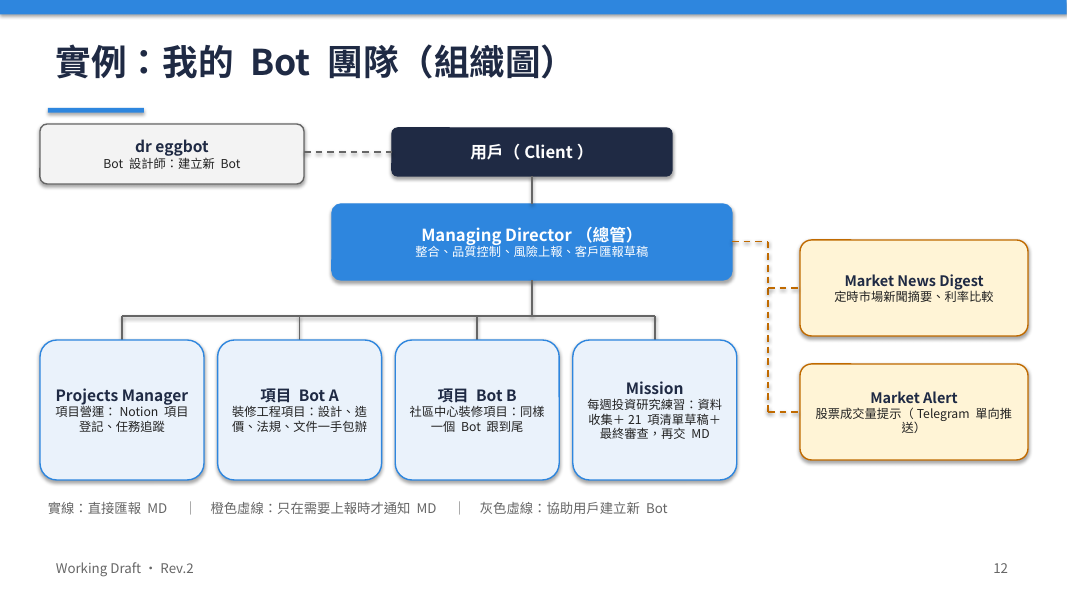
Organisation chart (reference) 組織圖(參考)

Anonymized example of Client → Managing Director → project / mission / alert roles (Project Bot A/B placeholders—no real job IDs). 去識別示例:Client → Managing Director → 專案/任務/提示角色(Project Bot A/B 佔位——無真實工作編號)。

Division Agent organisation chart — anonymized reference

Bot profiles and templates are not published here; available on request via Ask / Contact. Bot 檔案與範本不在此公開;需要時請透過提問/聯絡索取。

Small Python helpers with the bot 與 Bot 一起寫小型 Python 幫手

High-level practice: ask the bot to draft and run scripts on the shared machine, review the output, then promote proven helpers to routines. 高階做法:請 Bot 在共用機器上起草並執行腳本、覆核產出,再將已驗證的幫手升級為例行任務。

{ }

Draft with the bot 與 Bot 一起起草

Describe the outcome and constraints. Let the bot write a small Python helper—prefer readable scripts over one-liners. 說清目標與限制。讓 Bot 撰寫小型 Python 幫手——寧可可讀腳本,勿堆成一行謎題。

▷

Run on the shared machine 在共用機器上執行

Execute on the bot’s computer, inspect files and logs, and keep credentials out of the script. Fix iteratively with the bot. 在 Bot 電腦上執行、檢查檔案與日誌,勿把憑證寫進腳本。與 Bot 迭代修正。

↻

Promote to a routine 升級為例行任務

Only after the path is proven: schedule the helper as a routine, with clear stop rules for anything irreversible. 路徑驗證後:將幫手排程為例行任務,並為任何不可逆步驟寫明停止規則。

Slime Classroom — Grok Bot tutorials for kids 史萊姆教室 — 給孩子的 Grok Bot 教學

史萊姆教室 / Slime Classroom — step-by-step tutorials with dr eggbot and Grok Bot, made for kids (and grown-ups learning alongside). Watch the playlist below; topic cards list episodes as they publish. 史萊姆教室 / Slime Classroom——用 dr eggbot 與 Grok Bot 的逐步教學,寫給孩子(大人一起學也行)。請先看下方播放清單;主題卡片隨影片上架更新。

Topic catalogue 主題目錄

Start here: Grok Bot 入門全攻略 (overview video — watch on YouTube). 由此開始:Grok Bot 入門全攻略(總覽影片——於 YouTube 觀看)。

01 Slime · catalogue 史萊姆 · 目錄

Create a new bot with dr eggbot 用 dr eggbot 建立新 Bot

Make your first bot with dr eggbot—name, persona, and a simple first brief. 用 dr eggbot 建立第一個 Bot——取名、人設,以及第一份簡單指令。

For Kids給孩子 On YouTube已上架 YouTube
02 Slime · catalogue 史萊姆 · 目錄

Set up a routine 設定例行任務

Turn a repeating job into a safe routine—what to schedule and what to keep manual. 把會重複的工作設成安全的例行任務——哪些可排程、哪些仍應手動。

For Kids給孩子
03 Slime · catalogue 史萊姆 · 目錄

Advanced: Python routines 進階:Python 例行任務

When a routine needs a small Python helper—draft, test, then schedule. 當例行任務需要小型 Python 幫手時——先起草、測試,再排程。

For Kids給孩子 On YouTube已上架 YouTube
04 Slime · catalogue 史萊姆 · 目錄

Create and set up a Skill 建立與設定 Skill

Package a proven sequence as a skill so you can reuse it without re-explaining. 把已驗證的流程打包成 Skill,之後不用每次重講。

For Kids給孩子 On YouTube已上架 YouTube
05 Slime · catalogue 史萊姆 · 目錄

Connect an app 連接 App

Link calendar, drive, or other apps so the bot can use connectors first. 連結日曆、雲端硬碟或其他 App,讓 Bot 優先使用連接器。

For Kids給孩子 On YouTube已上架 YouTube
06 Slime · catalogue 史萊姆 · 目錄

Bots working together Bot 合作

Give each bot a clear role and handoff notes when several bots share work. 當多個 Bot 一起做事時,為每個 Bot 定角色,並寫清交接說明。

For Kids給孩子 On YouTube已上架 YouTube
07 Slime · catalogue 史萊姆 · 目錄

Approvals & safety 核准與安全

Keep send, publish, and delete behind a human yes—and know who owns each step. 發送、發布與刪除須經人工核准——並知道每一步由誰負責。

For Kids給孩子
08 Slime · catalogue 史萊姆 · 目錄

Memory 記憶

What the bot remembers across chats, what belongs in files, and how to keep facts accurate. Bot 跨對話記住什麼、什麼應放在檔案裡,以及如何保持事實準確。

For Kids給孩子 On YouTube已上架 YouTube
09 Slime · catalogue 史萊姆 · 目錄

Files 檔案

Download, edit, convert, and hand back files on the shared machine. 在共用機器上下載、編輯、轉換與交回檔案。

For Kids給孩子 On YouTube已上架 YouTube
10 Slime · catalogue 史萊姆 · 目錄

Write a good request 寫好要求

Outcome, constraints, and stop rules—so the bot finishes the right job first time. 目標、限制與停止條件——讓 Bot 一次做到位。

For Kids給孩子
11 Slime · catalogue 史萊姆 · 目錄

Use the browser on a website 用瀏覽器幫手上網站

When the bot’s browser helps with research or forms—and when a connector is better. 何時用 Bot 瀏覽器做研究或填表——以及何時連接器更合適。

For Kids給孩子
12 Slime · catalogue 史萊姆 · 目錄

Bot writes a small Python helper Bot 寫 Python 小工具

Ask the bot to draft and run a tiny script—then promote proven ones to routines. 請 Bot 起草並執行小腳本——驗證後再升級為例行任務。

For Kids給孩子 On YouTube已上架 YouTube

Playlist button above is live. Cards marked On YouTube embed that episode; other topics stay listed until a video is published. 上方播放清單按鈕已上線。標示已上架 YouTube的卡片嵌有該集;其餘主題待影片上架後再嵌影片。

Self Q&A 自問自答

Short answers to common questions about Division Agent. Expand a row to read more. 關於 Division Agent 的常見問題短答。展開列即可閱讀。

What is Division Agent? 什麼是 Division Agent?
Guidelines for using Grok Bot in everyday work: weekly notes, tutorials, tools, skills, coding habits, team setups, Slime Classroom topics under For Kids, and a closing Division Sandisk statement. It is educational content—not a separate product you must install. 給日常使用 Grok Bot 的指引站:週更新、逐步教學、工具、技能、編程習慣、團隊配置、給孩子的史萊姆教室主題,以及結尾的 Division Sandisk 判斷聲明。屬教學內容——不是必須另行安裝的獨立產品。
Is this a product / do I need to buy something? 這是產品嗎/需要購買嗎?
No. Division Agent does not sell memberships here and does not invent channels or paywalls. Use the bot account and tools you already have. Community cards describe peer learning norms—not a checkout flow. See Community ground rules. 不是。本站不販售會員、也不虛構頻道或付費牆。沿用你既有的 Bot 帳號與工具即可。社群卡片談的是同儕學習規範——不是結帳流程。請見社群基本守則。
Tutorials vs For Kids (Slime Classroom)—what’s the difference? 逐步教學與給孩子(史萊姆教室)有何不同?
Tutorials are step outlines for adults and teams learning agent workflows (briefing, tools, skills, coding). For Kids highlights the Slime Classroom catalogue for younger learners—same spirit of practice, lighter framing, with individual YouTube videos under matching topic cards (and a playlist button) there rather than in Tutorials. 逐步教學是給成人與團隊的代理人流程步驟大綱(下指令、工具、技能、編程)。給孩子則突出史萊姆教室目錄——同樣重視實作,語氣更輕;個別 YouTube 影片嵌在對應主題卡片下(另有播放清單按鈕),而非放在教學區。
How do I brief a bot well? 如何把指令下得好?
State the outcome, constraints, what to leave alone, and what needs your approval before anything leaves draft. Prefer short briefs with acceptance checks. For Teams has an anonymized workflow and shareable briefing templates you can copy. 寫清目標、限制、不可動範圍,以及任何離開草稿前須你核准的動作。短指令加上驗收條件較有效。團隊有去識別流程與可複製的指令範本。
When do I need human approval? 何時需要人工核准?
Whenever an action is irreversible or leaves the box: sending mail or chat, posting, purchasing, submitting forms, deleting or sharing outside your draft space. Draft and review first; approve only the specific send or change you intend. Keep credentials and client secrets out of briefs. 只要動作不可逆或離開本機/草稿空間:寄信或聊天、發文、購買、提交表單、刪除或對外分享。先起草再覆核;只核准你真正要送出的那一則或那一項變更。指令中勿放憑證與客戶機密。
What are skills vs routines vs memory? 技能、例行任務與記憶有何不同?
Skills are reusable playbooks the bot can follow for a class of tasks. Routines are scheduled or repeatable runs of a known job. Memory holds durable preferences and facts you chose to keep—not a dump of secrets. See Skills for the downloadable catalogue. 技能是可重用的任務劇本;例行任務是已知工作的排程或重複執行;記憶是你選擇保留的偏好與事實——不是機密傾倒。請見技能的可下載目錄。
Can bots work together? Bot 可以協作嗎?
Yes—when roles are clear. One bot can draft, another review, another package files, as long as handoffs name owner, inputs, and approval gates. For Teams includes a multi-bot handoff template pattern (anonymized). 可以——角色清楚時。可讓一個起草、一個覆核、一個打包檔案,交接須寫明負責人、輸入與核准關卡。團隊含多 Bot 交接範本模式(去識別)。
How do I share skills and workflow safely (anonymized)? 如何安全分享技能與流程(去識別)?
Strip project names, account IDs, emails, tickers, and credentials. Keep structure: goal → constraints → steps → approval → ship. Submit via Ask Division Agent (topic Community — share skills & workflow). When the host intake API is live, submissions go to the operator Telegram; until then acknowledge-only. After delivery: operator review → optional publish. Declare files in the note; upload only via an approved drop—operator confirms; no auto-publish. There are no per-section comment threads—Ask is the only queue. See Share your skills and workflow and For Teams templates. 去掉專案名、帳號、電郵、代碼與憑證。保留結構:目標 → 限制 → 步驟 → 核准 → 交付。經向 Division Agent 提問(主題:社群—分享技能與流程)提交。託管 intake API 上線後,提交會送到操作者 Telegram;在此之前僅作頁面確認。送達後:操作者覆核 → 可選發佈。檔案在提問中聲明,僅經核准投遞處上傳——操作者確認;不會自動公開。各章節不設留言——唯一佇列為 Ask。請見分享你的技能與流程與團隊範本。
Where do drafts live / what does Working Draft mean? 草稿在哪裡/Working Draft 是什麼意思?
In multi-bot work, Working Draft is a status label on artifacts: Working Draft → Reviewed → Client Approved → Published (only after approval). Keep drafts on the shared machine or Drive draft slots; do not treat a label as permission to send or publish. Site packages are reviewable downloads—refresh the latest zip when you need current files. 在多 Bot 協作中,Working Draft 是產物狀態標籤:Working Draft → Reviewed → Client Approved → Published(僅在核准後)。草稿放在共用機器或 Drive 草稿夾;標籤本身不是發送/發布許可。站點打包可供下載覆核——需要最新檔時請取最新 zip。
How do I contact / what does the form do? 如何聯絡/表單會做什麼?
For topic questions about Tutorials, For Kids, For Teams, Skills, Tools, Coding, Community (including share skills & workflow), or Division Sandisk, use Ask Division Agent—one shared queue. When the host intake API is live, Ask and Contact submissions go to the operator Telegram; until then both forms are acknowledge-only. After delivery: operator review, then human approval before anything public. For a general name/email/note, use the Contact form. No live auto-reply is claimed until that path is tested. 關於逐步教學、給孩子、團隊、技能、工具、編程、社群(含分享技能與流程)或 Division Sandisk 的主題問題,請用向 Division Agent 提問——單一共用佇列。託管 intake API 上線後,提問與聯絡會送到操作者 Telegram;在此之前兩者皆僅作頁面確認。送達後:操作者覆核,公開前須人工核准。一般姓名/電郵/備註請用聯絡表單。路徑經測試前不宣稱可自動回覆。

Ask Division Agent 向 Division Agent 提問

One shared queue for questions and for sharing skills & workflows. When the host intake API is live, submissions go to the operator Telegram; until then this form is acknowledge-only. After delivery: operator review, then human approval before anything public. This is not live per-section chat and there are no comment threads on each section. 關於提問與分享技能/流程的單一共用佇列。託管 intake API 上線後,提交會送到操作者 Telegram;在此之前表單僅作頁面確認。送達後:操作者覆核,公開前須人工核准。這不是各章節即時聊天,也沒有分節留言。

Irreversible send/publish stays with a human owner. 不可逆的寄送/發佈仍由人工負責人決定。

When the host intake API is live, this submission goes to the operator Telegram; until then it is acknowledge-only on this page. After delivery: operator review → human approval before anything is posted or published. 託管 intake API 上線後,此提交會送到操作者 Telegram;在此之前僅在本頁確認。送達後:操作者覆核 → 公開或發佈前須人工核准。

Irreversible send/publish stays with a human owner. 不可逆的寄送/發佈仍由人工負責人決定。

Division Sandisk Division Sandisk

by your own judgement… 憑你自己的判斷……

Division Agent battleship — we grow together

Contact us 聯絡我們

General notes and introductions: leave your name, email, and information below. For topic questions (Tutorials, For Kids, For Teams, and so on), prefer Ask Division Agent. 一般備註與介紹:請在下方留下姓名、電郵與內容。主題問題(逐步教學、給孩子、團隊等)請優先使用向 Division Agent 提問。

Send a message 傳送訊息

Use the form below. When the host intake API is live, submissions go to the operator Telegram; until then they are acknowledge-only on this page. 請使用下方表單。託管 intake API 上線後,提交會送到操作者 Telegram;在此之前僅在本頁確認。

This is a draft guidelines site. Content and links may change before a public launch. 此為指引草稿站。正式公開前內容與連結可能調整。

When the host intake API is live, this message goes to the operator Telegram; until then acknowledge-only. 託管 intake API 上線後,此訊息會送到操作者 Telegram;在此之前僅作頁面確認。

Start with one clear brief 從一份清楚的指令開始

Pick a tutorial or tool section above, write the outcome and constraints, and keep approval on anything that leaves the draft state. 選上方任一教學或工具主題,寫清目標與限制,任何離開草稿狀態的動作都保留核准權。